What a call sheet is
A call sheet is the one page a play-caller holds on game day: plays grouped into the situations you expect to face, in the order you want to call them, decided on Tuesday so Friday is a glance instead of a search. Every level uses one. The structure is boxes, and the work is deciding what goes in each box. If you have never built one, the guide walks through it step by step, and the blank template is a free printable if you want to start on paper.
Boxes that fill themselves
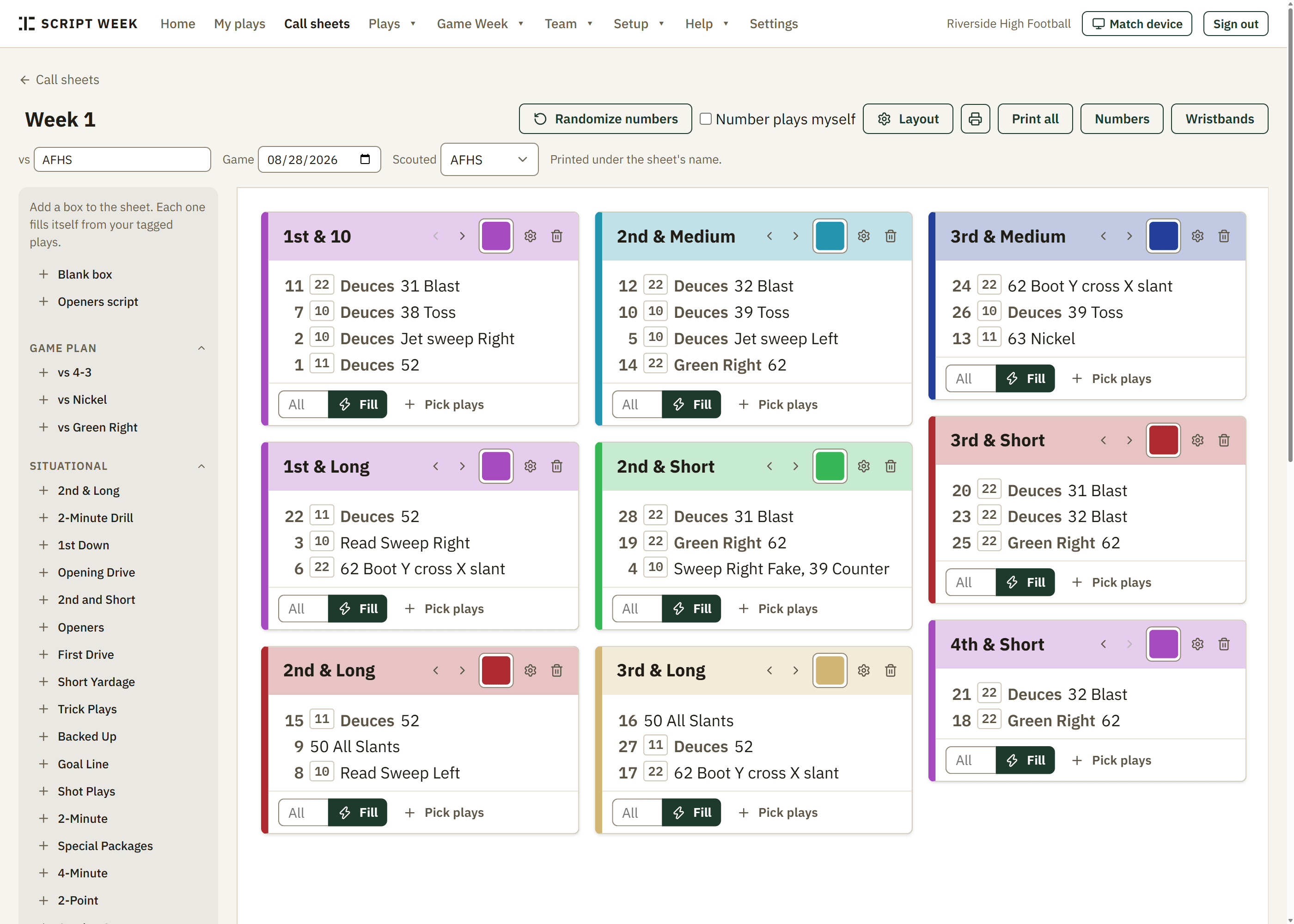
In Script Week a box is a situation: 1st & 10, 3rd & short, red zone, two-minute, coming out. Add one from the preset list and it fills itself from your library with every play tagged for that situation, in your order. Add a blank box and pick plays by name for the ones that do not fit a filter, like openers or a trick play. Drag to reorder inside a box, color the boxes so you can find a section in the cold, and the sheet lays itself out in columns to fit the page.
The reason this works is the tagging. A play tagged 3rd, Short, Left hash, 12 personnel shows up in every box whose filter matches, and when you change the play, every sheet that carries it follows. There is also a matrix layout, which turns one tag dimension into the sheet's columns, down across the top for example, for staffs that read a grid rather than boxes.
Numbers and wristbands
Every play on the sheet gets a call number. Randomize deals a fresh set per side each week, so a scout cannot decode a signal from last Friday's film, and it asks before it re-deals once numbers exist, because printed wristbands would be wrong. Prefer your own numbers? Type them. Prefer permanent ones? Set a number on the play itself, and every new sheet inherits it. A play you put in two boxes gets a different number in each; the second one is a decoy that fills a spare slot on a later wristband window.
Wristband inserts print from the same numbers, sized for a standard quarterback band at 4.25 by 2.75 inches, one to five windows, with the plays split across windows in number order and as many copies per page as fit. A number index prints alongside for the coach. Change a number on the sheet and the band, the index and the sheet all agree, because they are one list.
Printing
The sheet scales itself to one letter or legal page and tells you when it runs over rather than quietly shrinking to nothing. Print all sends the sheet, the number index and the wristbands to the printer in one job. Duplicate a sheet to start next week from this week, and it keeps its boxes, plays and numbers. Two coaches can have the same sheet open; if one changes it, the other gets a banner offering a reload instead of a silent overwrite.
On game day
Open the sheet on a phone or tablet at the game and tap Ran as you call each play. The log is your play order, with the quarter on every call. With the Film add-on, the Film Room starts from that log: the snaps are already there in order, and you fill in down, distance and the result as you watch. Track the game on the sideline and there is nothing to type up or upload after it.
Defensive call sheets
Defense is not an afterthought. Plays are offense, defense or special teams, each side has its own number pool, and a defensive coordinator builds a sheet from fronts and coverages the same way the offense builds one from runs and passes. Most defensive staffs call by signal rather than number, so the wristband page lets you print offense only.
What it costs
Drawing and tagging plays is free for one coach with up to 20 active plays, and so is one call sheet with its wristbands. Unlimited call sheets are on the Coach plan at $8/mo billed annually ($96/yr), which also removes the play limit. Staff, at $20/mo, adds up to ten coaches and the scouting tools. The price you subscribe at is locked for as long as the subscription stays active.